Building This Website: A Cloud-Native Engineer's Journey Back to Full-Stack
After 6 years focused on backend and cloud-native systems, I rebuilt my portfolio with Next.js, TypeScript, and Firebase. Here's why I chose these technologies and what I learned returning to full-stack development.
LUSK
Published on April 24, 2026
Building This Website: A Cloud-Native Engineer's Journey Back to Full-Stack
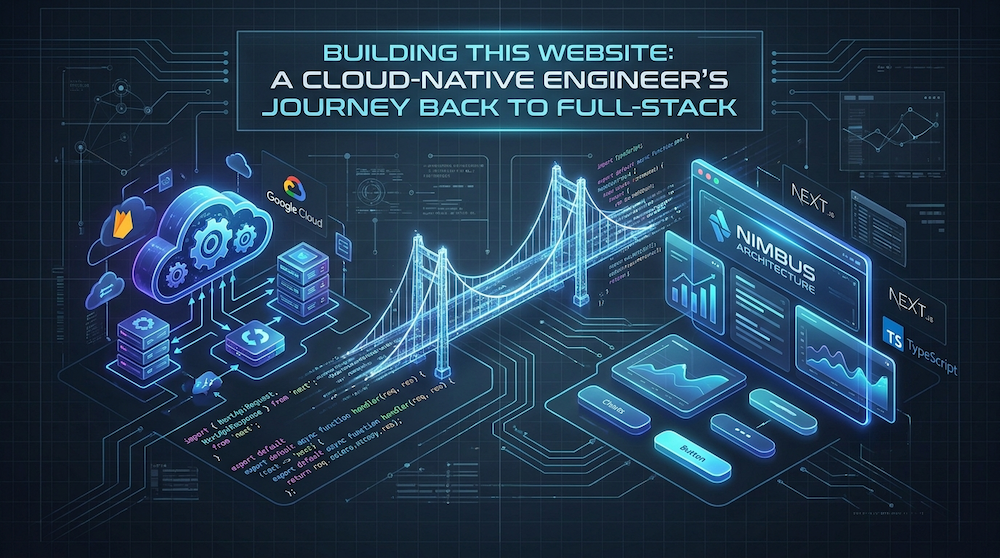
For the past six years, I've lived in the backend and cloud-native world. Kubernetes, microservices, Terraform, event-driven architecture — these have been my daily tools. But somewhere along the way, I realized something: I'd lost touch with the full-stack perspective.
So I decided to build this website from scratch. Not just as a portfolio, but as a deliberate exercise in reawakening frontend skills while applying backend discipline to the frontend world.
This is the story of why I chose this stack, how I approached the architecture, and what I learned returning to full-stack after half a decade in the backend trenches.
---
Why Build This at All?
As a cloud-native engineer, I could have used a static site generator, a no-code platform, or even a pre-built template. But that wouldn't have served my purpose.
I needed to:
- Refresh frontend skills — React, TypeScript, modern CSS, and performance optimization are essential for B2B clients who expect full-stack competence
- Demonstrate architectural thinking — Show that I approach frontend with the same rigor as backend: performance, scalability, maintainability
- Own the entire stack — From infrastructure (Firebase Hosting) to deployment (GitHub Actions) to the codebase itself
This isn't just a website — it's a living proof of concept that a cloud-native engineer can deliver polished, performant frontend experiences without sacrificing backend excellence.
---
Tech Stack: Choosing Tools with Intent
Every technology choice was deliberate. Here's the rationale:
Next.js 16 (App Router)
Why: Server Components by default, static export capability, excellent TypeScript support, built-in optimizations.
The App Router is a game-changer. By default, components are Server Components — no JavaScript hydration unless explicitly needed. This aligns perfectly with performance-first philosophy:
1// Server Component — zero client JS2export default async function Page() {3 const posts = await getAllPosts();4 return <BlogGrid posts={posts} />;5}67// Client Component — only when interactivity needed8'use client';9export default function InteractiveForm() {10 const [state, setState] = useState();11 // ...12}
Key wins:
- Automatic code splitting
- Server-side rendering with static export (`output: 'export'`)
- Route handlers for API endpoints (contact form)
- Built-in i18n support via next-intl
---
TypeScript (Strict Mode)
Why: After years of Go and TypeScript on the backend, I can't imagine writing untyped JavaScript. Type safety prevents entire classes of bugs.
The project uses strict TypeScript configuration:
- `strict: true` — no implicit any
- `noImplicitReturns` — all code paths return
- `exactOptionalPropertyTypes` — stricter object typing
Example from the blog post loader:
1export interface PostMeta {2 slug: string;3 title: string;4 date: string;5 description: string;6 author: string;7 tags: string[];8 category: string;9 image: string;10 readingTime: string;11 locale: string;12}
Types serve as documentation and prevent mistakes before they happen. In a professional B2B context, this is non-negotiable.
---
Tailwind CSS v4
Why: Utility-first CSS with zero configuration overhead. The v4 release removed the need for `tailwind.config.ts` entirely — configuration lives in CSS via `@theme` blocks.
The design system uses Material Design 3 inspired tokens defined in `globals.css`:
1@theme {2 /* Colors */3 --color-background: #121318;4 --color-on-surface: #e8e8e8;5 --color-primary-container: #1e2130;6 --color-on-primary-container: #adc6ff;7 --color-secondary: #55d7ed;89 /* Typography */10 --font-sans: 'Inter', 'Space Grotesk', sans-serif;1112 /* Border radius */13 --radius-sm: 0.375rem;14 --radius-md: 0.5rem;15}
This approach keeps styling close to the code while maintaining consistency. Mobile-first responsive design is straightforward:
1<div className="py-24 px-8 md:px-12 lg:px-24 max-w-7xl mx-auto">2 {/* Mobile: 2rem padding, Tablet: 3rem, Desktop: 6rem */}3</div>
---
Firebase (Hosting + Cloud Functions)
Why: I've used GCP and Kubernetes extensively, but for a portfolio site, Firebase is the right tool for the job.
Hosting: Static export means I can deploy anywhere (S3, Netlify, Vercel). I chose Firebase because:
- Free tier is generous
- Global CDN out of the box
- Simple CLI (`firebase deploy`)
- Integrated Cloud Functions for backend needs
Cloud Functions: The contact form handler runs as a Node.js 24 function with rate limiting and validation:
1export const contactSubmit = onRequest(2 { region: 'us-central1' },3 corsMiddleware,4 rateLimiter,5 jsonParser,6 validateContactSchema,7 async (req, res) => {8 // Process form submission9 // Send email, store in Firestore10 // Return success response11 }12);
This demonstrates that even a "simple" portfolio needs proper backend architecture: validation, rate limiting, CORS handling.
---
Framer Motion
Why: Animation should enhance UX, not distract. Framer Motion provides performant, accessible animations with minimal bundle overhead.
Scroll-triggered reveals use the `Reveal` component:
1<Reveal>2 <section className="opacity-0 translate-y-8">3 {/* Content */}4 </section>5</Reveal>
The component handles `prefers-reduced-motion` automatically — accessibility isn't an afterthought.
---
Architecture: Backend Thinking on the Frontend
The biggest shift from pure backend work was applying software engineering principles to frontend architecture.
Component Design: Single Responsibility
Each component does one thing well:
- `Navbar.tsx` — Navigation only
- `Hero.tsx` — Hero section only
- `BlogCard.tsx` — Single blog post preview
- `BlogGrid.tsx` — Grid layout for posts
No monolithic components. This makes testing, maintenance, and reuse straightforward.
Server vs Client Components
Next.js App Router forces you to think about what truly needs client-side JavaScript:
Server Components (default):
- Data fetching
- Static content
- No interactivity needed
Client Components (explicit):
- Forms (contact page)
- Animations (Framer Motion)
- Locale switcher (next-intl hooks)
Result: Minimal JavaScript bundle. The homepage hydrates only what's necessary.
i18n: next-intl
Internationalization is baked in from day one, not bolted on later. The locale structure:
1app/[locale]/2 layout.tsx # Root layout with messages provider3 page.tsx # Homepage4 blog/5 page.tsx # Blog listing6 [slug]/page.tsx # Individual post
Messages are loaded server-side:
1export default async function Page({ params }: { params: Promise<{ locale: string }> }) {2 const { locale } = await params;3 const messages = await getMessages({ locale });4 // Pass to components5}
No context providers cluttering the component tree. Clean, type-safe, performant.
Testing with Vitest
I brought backend rigor to the frontend by enforcing a robust testing methodology. The project uses Vitest with React Testing Library:
1// tests/BlogPost.test.tsx2describe('BlogPost', () => {3 it('renders title and content correctly', () => {4 render(<BlogPost post={mockPost} />);5 expect(screen.getByText('Test Post')).toBeInTheDocument();6 });7});
Validating rendering and functionality ensures stability across updates and demonstrates that frontend code deserves the same QA standard as backend deployments.
Technical SEO as an Engineering Problem
Passing Lighthouse Core Web Vitals is only half the battle. I approached SEO as an engineering task by implementing:
- Automated XML Sitemaps (`next-sitemap`)
- JSON-LD schemas using a `StructuredData` module
- Automated RSS Feeds (`app/[locale]/rss/page.tsx`)
This structured approach ensures Google correctly models the exact business value and portfolio relationships across the site.
---
Static Export: The Performance Winner
`next.config.ts` uses `output: 'export'`:
1const nextConfig: NextConfig = {2 output: 'export',3 // Static HTML only — no Node.js server needed4};
This generates pure static files in `front/out/`:
- `index.html` — Homepage
- `blog/index.html` — Blog listing
- `blog/[slug]/index.html` — Individual posts
- `og/blog/[slug].svg` — Auto-generated OG images
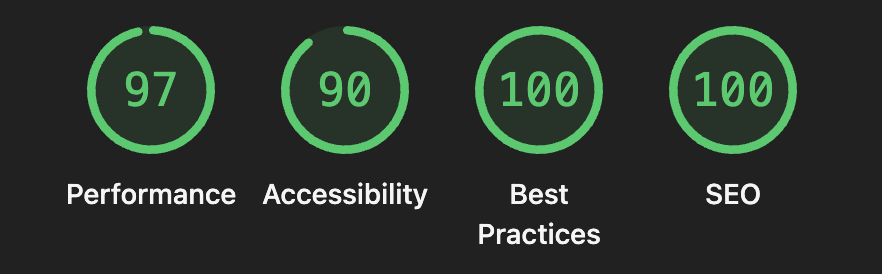
Deploy anywhere. No server runtime. Lighthouse scores consistently above 90.
To build and preview locally:
1cd front && npm run build2npx serve out -p 5000
---
Blog Engine: Markdown + gray-matter
No CMS, no database. Just Markdown files:
1content/posts/2 2026-04-15-cloud-native-best-practices/3 index.md # English4 index.pl.md # Polish
Frontmatter defines metadata:
1---2title: "Building Scalable Cloud-Native Applications"3date: "2026-04-15"4description: "Learn best practices..."5tags: ["kubernetes", "microservices"]6category: "Tutorial"7readingTime: "12 min"8---
The `lib/posts.ts` loader:
1. Reads filesystem at build time
2. Parses frontmatter with `gray-matter`
3. Converts Markdown to HTML with `remark`
4. Returns typed Post objects
During `next build`, `generateStaticParams` pre-renders all posts at build time:
1export function generateStaticParams() {2 const slugs = getPostSlugs('en').concat(getPostSlugs('pl'));3 return slugs.map(slug => ({ slug }));4}
No database queries at runtime. Everything is static. This is the ultimate performance optimization.
---
CI/CD: GitHub Actions + Firebase
Deployment is fully automated through two GitHub Actions workflows:
- `firebase-hosting-merge.yml` — Deploys to production on merge to `main`
- `firebase-hosting-pull-request.yml` — Deploys preview URLs for PRs
Each workflow:
- Checks out code
- Sets up Node.js 24.x
- Installs dependencies (`npm ci`)
- Builds the frontend (`npm run build`)
- Builds Cloud Functions (`npm --prefix functions run build`)
- Deploys to Firebase
No manual steps. Git is the single source of truth. Merge to `main` → live site.
---
Lessons Learned: Returning to Frontend
After 6 years of backend and cloud-native work, here's what I re-learned (and re-appreciated):
1. CSS is Still Hard
I can design distributed systems with confidence, but centering a div still requires Stack Overflow. Tailwind helps, but the mental shift from infrastructure-as-code to styling-as-utility classes was real.
Takeaway: Frontend skills decay without practice. Even as a senior engineer, you need to stay current.
2. JavaScript Ecosystem Moves Fast
Next.js 16, React 19, Tailwind v4 — everything changed since I last built a frontend app professionally (React 16 era). The DX improvements are massive, but the learning curve is steep if you're not using it daily.
Takeaway: Backend engineers should occasionally build frontend projects to stay relevant. The web platform evolves rapidly.
3. Performance is Multidimensional
Backend performance = latency, throughput, cost. Frontend performance = Lighthouse scores, Core Web Vitals, SEO, accessibility, bundle size, hydration cost, render timing, ...
It's a different kind of complexity, but no less demanding.
Takeaway: Frontend performance requires obsessive attention to detail. Every component, every image, every script tag matters.
4. Server Components Change Everything
The React team got this right. By pushing rendering to the server by default, they forced a rethinking of frontend architecture. The result: less JavaScript, better performance, cleaner code.
Takeaway: Server Components aren't just an optimization — they're a paradigm shift. Use them aggressively.
5. TypeScript on the Frontend is Table Stakes
In backend work, types are assumed. In frontend, many projects still use plain JavaScript. That's a mistake. TypeScript catches bugs early, enables refactoring, and serves as documentation.
Takeaway: Never start a frontend project without TypeScript. Not even for a portfolio.
---
What This Means for B2B Clients
I built this website not just as a portfolio, but as a demonstration of how I approach client projects:
- Architectural rigor applied to frontend (Server Components, static generation, type safety)
- Infrastructure thinking (CDN, caching, performance optimization, SEO)
- Automation (CI/CD, OG image generation, static builds)
- Full-stack ownership — I can handle backend (Firebase Functions) and frontend in the same codebase
When a B2B client hires me, they're getting someone who understands the entire system — from Kubernetes cluster to user's browser. This project proves I haven't forgotten the frontend while mastering the backend.
---
Conclusion
Building this website was equal parts skill refresh and statement of principles. It shows that:
- Cloud-native engineers can deliver exceptional frontend experiences
- Modern frameworks (Next.js, Tailwind) enable professional results without sacrificing engineering rigor
- Backend best practices (type safety, automation, performance) apply equally to frontend
After 6 years of backend specialization, I'm returning to full-stack — but with a cloud-native lens. Everything is typed, automated, static, and performant by default.
That's how I build for clients, and that's how I built this.
---
Want to discuss how this approach could benefit your project? [Contact me](/contact).